Volume Booster - Music & Sound
- 4.5
- Rating
- 1.00M
- Installs
- Free
- Price

 Analysis by App-foxy
I approached Volume Booster - Music & Sound as a practical listening tool rather than a replacement for a full music player. Its purpose is straightforward: give the phone’s audio output an extra push when the normal volume range feels too quiet. In my experience, that narrow focus can be useful, especially when I am trying to hear spoken audio in a noisy room or make a familiar song easier to follow. It also means I have to judge it by different standards from an equalizer, streaming service, or media library.
This free Music & Audio app comes from Amar Es Ayudar Inc and is suitable for Everyone. It has reached over a million installs and holds a 4.5 average from around twelve thousand ratings, which suggests that the simple idea has found a sizable audience. I tested the experience with an accessibility-minded eye: how quickly I can understand what is happening, how much precision the controls demand, and whether the result remains useful in real situations rather than only in a quiet room.
Clear controls make the first use easy
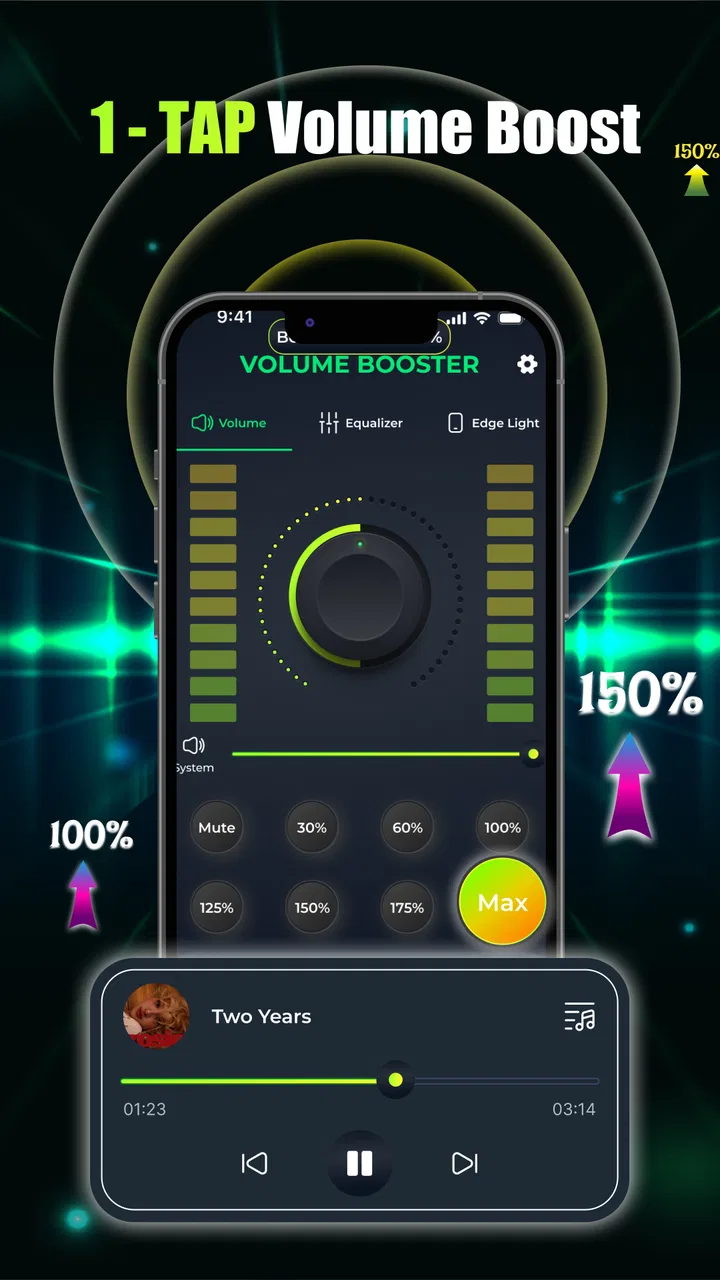
The strongest part of the experience is its directness. The app is built around the idea of increasing loudness with minimal effort, so I do not have to work through a large music catalog, edit audio files, or learn a complicated sound profile. That matters for anyone who gets tired or distracted by crowded interfaces. A person who only wants a quick boost can approach it with a clear goal instead of navigating through unrelated tools.
You May Also Like

 Blood Strike: 2.5 Anniversary
Blood Strike’s Loadouts Turn Every Drop Into a Tactical Gamble
A close look at Blood Strike’s custom loadouts: how fast access to signature weapons reshapes its battle royale rhythm, rewards preparation, and narrows the gap between fights.

 Pandora - Music & Podcasts
Pandora’s Music Is Easy to Start, but Harder to Recover
Pandora’s strength is its low-effort path from a seed to a station. Its weak spot is how much confidence it asks you to place in connection, setup, and quiet recovery.

 8 Ball Pool
 Is Built on Rivalries, Rematches, and Routine
A close look at the rivalries, rematches, shared routines, and unanswered safety questions that turn a quick pool match into a persistent mobile community.

 Samsung Music
’s Quiet Strength Is Playing What You Already Own
Its reach comes less from spectacle than from dependable access to a personal library. That simplicity is both the app’s strongest retention engine and its ceiling.

 AccuWeather: Weather Radar
AccuWeather Review: A Quick, Clear Forecast for Everyday Decisions
For everyday plans, the best forecast is the one you can understand quickly. AccuWeather makes rain timing, radar, and local conditions easy to act on, with a few trade-offs.

 Hill Climb Racing
Why Hill Climb Racing Still Turns Crashes Into One More Run
A tiny car, a bumpy hill and one more upgrade: Hill Climb Racing keeps resurfacing because its simple chaos makes every near-miss feel personal.
More From Our News Desk
View All News


That simplicity is also helpful for readers who prefer a low-information screen. Large, obvious controls are generally easier to locate than small icons hidden among menus, and a single-purpose utility creates less mental load than a feature-heavy audio editor. I found the best workflow was to open the app before starting the content I wanted to hear, make a small adjustment, and then return to the song, video, podcast, or spoken recording.
There is an important distinction between readable navigation and guaranteed accessibility, though. A straightforward interface is not automatically comfortable for every person. Someone with low vision may still need stronger text contrast or a larger display setting, while someone using a screen reader may want to verify how the controls are announced. I would not treat the uncomplicated layout as proof of formal accessibility support. I would describe it more modestly: the limited purpose makes the app easier to understand than many audio utilities.
The current release is version 1.0.3, and that early version number fits the focused feel. I did not come away expecting a deep control panel. Instead, I saw a small tool intended to get out of the way. That is a benefit when speed matters, but it can feel restrictive if I want to shape bass, treble, balance, or a particular listening profile.
Why the one-tap approach can help
The most useful detail is not simply that the app makes sound louder; it is that the action is quick enough to fit into an existing routine. For example, I might be following a podcast while cooking and discover that the speaker’s voice is being lost under the extractor fan. Opening a dedicated booster is less disruptive than changing several audio settings or searching for another player. Once the speech is understandable again, I can put the phone down and continue with the task.
That workflow also suits people who do not want to remember a collection of audio settings. A family member who finds conventional volume menus confusing may understand a single purpose more readily: open the tool, adjust the output, and listen. I still recommend starting gently rather than moving immediately to the highest level. A louder signal is not necessarily a clearer one, and sudden changes can be uncomfortable for listeners who are sensitive to sound.
Another practical tip is to treat the booster as a temporary aid, not a permanent setting. I would check the phone’s ordinary volume after leaving the app, particularly before putting on headphones or handing the device to someone else. This small habit reduces the chance of an unexpectedly loud start the next time audio plays.
Motor and sensory comfort in everyday use
For users with limited dexterity, the value of a quick volume control depends on how much accuracy the interface requires. A control that can be reached without a long sequence of taps is potentially easier than a multi-level audio mixer. I found that the app’s narrow purpose reduces the number of decisions I need to make, which can be useful when fine motor control is tiring or when I am holding the phone in one hand.
At the same time, volume adjustment is a task where precision matters. A small movement can make the difference between comfortable speech and an unpleasant jump in loudness. I would use deliberate, modest changes, pausing after each one instead of dragging rapidly. That approach is especially sensible for people who are sound-sensitive, for children, or for anyone using earbuds. The app can increase output, but it cannot decide what level is safe or comfortable for a particular listener.
There is also a sensory trade-off that is easy to miss. Boosting a recording may raise the background noise along with the voice or music. If a podcast has a constant hiss, or a video was recorded in a busy street, extra loudness may make the unwanted sound more noticeable. In those cases, a player with speech enhancement, noise reduction, or an equalizer could be a better match. This utility is most convincing when the problem is insufficient level, not poor recording quality.
I would also avoid assuming that louder audio solves every hearing difficulty. Some listeners need a clearer balance between channels, stronger speech focus, or a hearing device configured for their needs. A general booster cannot replace those options. For someone who regularly struggles to understand ordinary conversation or media even at comfortable volume, raising output may add fatigue without delivering real clarity.
Where it fits when the surroundings are difficult
The clearest use case for me is situational access. In a quiet bedroom, the phone’s regular controls may already be enough. In a kitchen, on public transport, or beside a running appliance, a small increase can make a voice recording easier to follow. I can imagine using it before a short instructional clip, a navigation prompt, or a voice message when I cannot move to a quieter place.
It may also help when several people are listening from a short distance away, although I would be careful not to turn the phone into a loudspeaker at the expense of everyone nearby. A person with mild difficulty hearing a device can gain independence by making the sound more audible without asking another person to repeat the action. That is a meaningful benefit, but it works best when the environment allows personal control over the volume.
For shared spaces, headphones change the calculation. A booster may make private listening more intelligible, but the combination of amplified output and earbuds deserves restraint. I would begin at the lowest useful setting, listen for a moment, and stop increasing as soon as the words or music become clear. If the device is being used around children or people who are sensitive to sudden sounds, I would make the adjustment before playback and check it personally.
The app is less suitable for situations where the phone itself is physically blocked, the speaker is damaged, or the content is mixed badly. It cannot improve the position of the device, repair a weak connection, or turn a tiny speaker into a high-quality sound system. Moving closer, using a stable stand, choosing a quieter location, or using an appropriate external speaker may produce a better result without pushing the phone’s output as hard.
How it compares with ordinary alternatives
The usual alternative is the phone’s built-in volume slider. That remains the best choice for many people because it is already available, familiar, and integrated with the operating system. If normal volume is sufficient, there is little reason to add another step. I see this app as useful when the standard range feels limiting or when a dedicated shortcut is easier to remember than navigating system controls.
A music player with an equalizer is a better option for listeners who are trying to change the character of sound rather than its overall level. Adjusting frequencies can sometimes make speech more understandable without making every part of a recording louder. It can also help someone who prefers more bass or less treble. The trade-off is complexity: equalizers require experimentation, and a poor adjustment can make audio harsher or less balanced.
External speakers and headphones can outperform a phone booster when the real need is room-filling sound or improved separation. They may offer better clarity, but they cost more, require carrying another device, and are not always practical. A simple booster is appealing precisely because it stays with the phone and can be used quickly. I would choose it for occasional convenience, not as my first answer to a persistent sound-quality problem.
Streaming apps and podcast players may include their own playback controls, but those controls are tied to individual services. A dedicated utility can be more convenient when I move between different kinds of content. Even so, I would not expect it to normalize every recording or fix inconsistent loudness from one source to another. The advantage is access to extra output, not a complete audio-management system.
Remaining barriers and sensible limits
The biggest limitation is that amplification can expose the weaknesses of the original audio. A quiet but clean recording may benefit; a distorted recording may simply become louder and more tiring. This is why I would test the app with familiar content first. A short spoken clip is a better starting point than an unexpected music track with sharp peaks.
Another barrier is context switching. Even a simple tool adds an extra action between opening content and listening. If I need to repeat that action frequently, the phone’s standard controls or a player with integrated adjustment may be more convenient. People who rely on voice interaction, switch access, or other alternative input methods should also consider whether the app’s controls fit their established routine rather than assuming that one-tap wording means one effortless action for everyone.
I would keep expectations realistic about safety and comfort. The app is not a hearing assessment, a medical aid, or a substitute for professionally configured equipment. If increasing volume is the only way I can understand everyday audio, I would regard that as a reason to investigate the broader listening setup rather than continually raising the level. Breaks, quieter surroundings, correctly fitted headphones, and a hearing professional may all be more appropriate depending on the situation.
Privacy and device behavior are also part of a sensible decision, even when the visible interface is simple. Before relying on any audio utility, I would check how it behaves when another app starts playback, when a call arrives, or when the phone is locked. I would also confirm that the regular volume can be restored easily. These are not reasons to dismiss this particular tool; they are practical checks that prevent a small convenience from becoming a confusing part of a daily routine.
Who will get the most from it
I think the app is a good fit for someone who occasionally finds phone audio too quiet and wants a focused adjustment without learning a full audio editor. It can be especially useful for spoken content, quick listening sessions, and environments where relocating is inconvenient. Its free price removes the usual trial-cost concern, and the Everyone rating makes it broadly approachable as a general utility.
I would be more cautious recommending it to an audiophile, a person seeking detailed sound shaping, or someone with a continuing hearing difficulty. Those users may be better served by a quality player with more control, a properly chosen speaker or headset, or specialist support. The same applies to anyone who wants automatic loudness balancing across many recordings; a simple booster is not designed around that goal.
My own best practice would be to install it for specific situations, keep the boost conservative, and return to ordinary volume whenever possible. I would use it with clear speech first, avoid testing at maximum output, and check the phone’s level before switching to headphones. These small habits make the tool more comfortable and reduce the chance that convenience turns into excessive loudness.
Overall, Volume Booster - Music & Sound is a focused answer to a focused problem. Amar Es Ayudar Inc has kept the concept approachable, and its 4.5 average across around twelve thousand ratings reflects why many people may find that simplicity useful. The app does not replace a full equalizer, a better speaker, or hearing support, but it can remove one everyday barrier when the phone’s normal output is just not enough.
My inclusive verdict is positive with clear boundaries: it is most valuable as a quick, low-complexity listening aid, not as a universal solution for sound clarity. If you need occasional extra volume and prefer a direct interface, I would recommend trying it carefully. If you need precise audio shaping, hands-free control, or dependable help with an ongoing hearing challenge, I would choose a more specialized option instead.
FAQs for Volume Booster - Music & Sound
01What features does the Volume Booster - Music & Sound app offer?
The Volume Booster - Music & Sound app provides a range of features designed to enhance your audio experience. It includes a powerful equalizer, bass booster, and virtualizer. The app also offers customization options to adjust sound settings for music, videos, and notifications, ensuring optimal sound quality across all media.
02Is the Volume Booster app safe to use on my device?
Yes, the Volume Booster app is safe to use on both Android and iOS devices. It complies with standard safety protocols and does not access personal data without permission. However, as with any app that modifies system settings, it's important to use it judiciously to avoid potential speaker damage.
03Does using the Volume Booster app drain my device’s battery?
The Volume Booster app is designed to be efficient, but like any app that runs in the background, it can have a minor impact on battery life. It optimizes performance to minimize resource usage, ensuring that your device maintains a healthy balance between enhanced sound and battery consumption.
04Will the Volume Booster app work with all media players?
The Volume Booster app is compatible with most popular media players and streaming services. It enhances sound quality across various platforms, including music apps, video players, and even game audio. However, functionality might vary slightly depending on the specific media player or app being used.
05How does the Volume Booster app affect sound quality?
The Volume Booster app significantly improves sound quality by amplifying audio output and enhancing bass and treble frequencies. It allows for personalized sound settings, which can be tailored to different audio types, ensuring a richer and more immersive listening experience without distortion.
Pros
- Enhances audio output significantly.
- User-friendly interface and controls.
- Compatible with most music apps.
- Offers a customizable equalizer.
- Minimal impact on battery life.
Cons
- May cause distortion at high volumes.
- Limited features in the free version.
- In-app ads can be intrusive.
- Some devices may not support all features.
- Potential to damage speakers if misused.

Volume Booster - Music & Sound
Gallery